《Spring注解驱动开发》第07章:深入理解Spring的ImportSelector接口
写在前面
在前面的文章中,我们知道了可以使用ImportSelector接口实现向Spring容器中导入bean,那ImportSelector接口是如何实现的呢,接下来,我们就一探究竟!
项目工程源码已经提交到GitHub:https://github.com/binghe001/spring-annotation
ImportSelector接口概述
ImportSelector接口是至spring中导入外部配置的核心接口,在SpringBoot的自动化配置和@EnableXXX(功能性注解)都有它的存在。我们先来看一下ImportSelector接口的源码,如下所示。
package org.springframework.context.annotation;

import java.util.function.Predicate;
import org.springframework.core.type.AnnotationMetadata;
import org.springframework.lang.Nullable;

public interface ImportSelector {
	String[] selectImports(AnnotationMetadata importingClassMetadata);
	@Nullable
	default Predicate<String> getExclusionFilter() {
		return null;
	}
}
该接口文档上说的明明白白,其主要作用是收集需要导入的配置类,selectImports()方法的返回值就是我们向Spring容器中导入的类的全类名。如果该接口的实现类同时实现EnvironmentAware, BeanFactoryAware ,BeanClassLoaderAware或者ResourceLoaderAware,那么在调用其selectImports方法之前先调用上述接口中对应的方法,如果需要在所有的@Configuration处理完在导入时可以实现DeferredImportSelector接口。
在ImportSelector接口的selectImports()方法中,存在一个AnnotationMetadata类型的参数,这个参数能够获取到当前标注@Import注解的类的所有注解信息。
ImportSelector接口探秘
在这里我举个Spring中的实例来看一下:
@Target(ElementType.TYPE)
@Retention(RetentionPolicy.RUNTIME)
@Documented
@Import(TransactionManagementConfigurationSelector.class)
public @interface EnableTransactionManagement {
    boolean proxyTargetClass() default false;

    AdviceMode mode() default AdviceMode.PROXY;

    int order() default Ordered.LOWEST_PRECEDENCE;
}
此注解是开启声明式事务的注解,那么它的@Import所导入的类为TransactionManagementConfigurationSelector,那么我们看一下其类图:
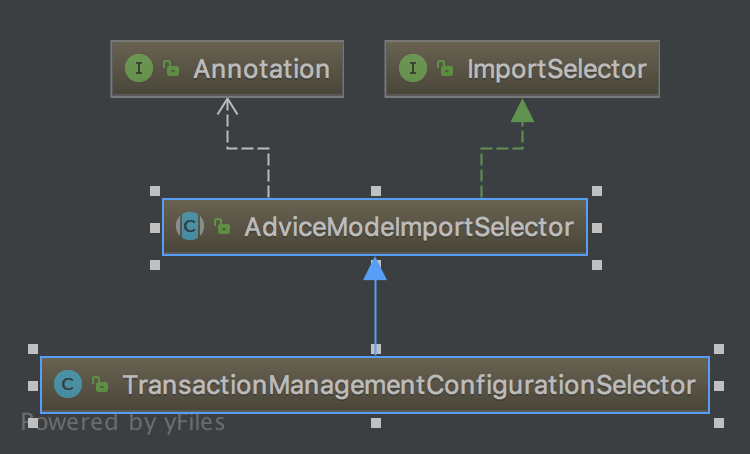
由此可知该类实现类ImportSelector接口。
前面说过,在SpringBoot的自动化配置和@EnableXXX(功能性注解)都有ImportSelector接口的存在,那我们就来自己定义一个@EnableXXX注解来更加深刻的理解ImportSelector接口。
自定义@EnableXXX注解
在这里我们先准备两个Spring的项目工程:spring-project与ssm-project,其中spring-project里我们先创建好如下结构目录:
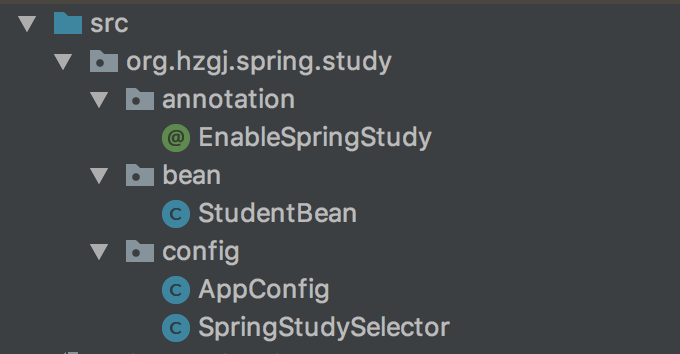
创建实体类
package org.hzgj.spring.study.bean
public class StudentBean{
    private Integer id;
    private String name;
    //省略setter和gettter
}
创建ImportSelector接口的实现类
package org.hzgj.spring.study.config;

import org.springframework.beans.BeansException;
import org.springframework.beans.factory.BeanFactory;
import org.springframework.beans.factory.BeanFactoryAware;
import org.springframework.context.annotation.ImportSelector;
import org.springframework.core.type.AnnotationMetadata;

public class SpringStudySelector implements ImportSelector, BeanFactoryAware {
    private BeanFactory beanFactory;

    @Override
    public String[] selectImports(AnnotationMetadata importingClassMetadata) {
        importingClassMetadata.getAnnotationTypes().forEach(System.out::println);
        System.out.println(beanFactory);
        return new String[]{AppConfig.class.getName()};
    }

    @Override
    public void setBeanFactory(BeanFactory beanFactory) throws BeansException {
        this.beanFactory = beanFactory;
    }
}
在这里我们实现ImportSelector接口和BeanFactoryAware接口,重写selectImports方法,最后我们返回的是AppConfig的类名,同时打印出相关的注解元数据与BeanFactory
自定义@EnableSpringStudy注解
package org.hzgj.spring.study.annotation;

import org.hzgj.spring.study.config.SpringStudySelector;
import org.springframework.context.annotation.Import;
import java.lang.annotation.*;

@Retention(RetentionPolicy.RUNTIME)
@Documented
@Target(ElementType.TYPE)
@Import(SpringStudySelector.class)
public @interface EnableSpringStudy {
}
在这里我们仿照@EnableTransactionManagement来实现自定义注解,注意使用@Import导入我们刚才写的SpringStudySelector。
创建配置类
package org.hzgj.spring.study.config;

import org.hzgj.spring.study.bean.StudentBean;
import org.springframework.context.annotation.Bean;
import org.springframework.context.annotation.Configuration;

@Configuration
public class AppConfig {
    @Bean
    public StudentBean studentBean() {
        StudentBean studentBean = new StudentBean();
        studentBean.setId(19);
        studentBean.setName("admin");
        return studentBean;
    }
}
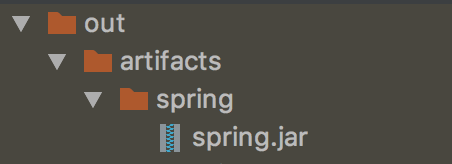
当都完成以后我们打个jar包,准备引入至其他工程:
使用自定义@EnableXXX注解
完成ssm-project工程中的AppConfig配置类
首先我们将刚才的spring.jar导入到ssm-project工程里
在对应的配置类上添加上spring-project中定义的@EnableSpringStudy注解
@Configuration //表明此类是配置类
@ComponentScan // 扫描自定义的组件(repository service component controller)
@PropertySource("classpath:application.properties") // 读取application.properties
@MapperScan("com.bdqn.lyrk.ssm.study.app.mapper") //扫描Mybatis的Mapper接口
@EnableTransactionManagement //开启事务管理
@EnableSpringStudy
public class AppConfig {

  //....省略配置代码
}
3)编写Main方法
public static void main(String[] args) throws IOException {
        AnnotationConfigApplicationContext applicationContext = new AnnotationConfigApplicationContext(AppConfig.class);
        StudentBean studentBean = applicationContext.getBean(StudentBean.class);
        System.out.println(studentBean.getName());
}
运行后输出结果:
org.springframework.context.annotation.Configuration
org.springframework.context.annotation.ComponentScan
org.springframework.context.annotation.PropertySource
org.mybatis.spring.annotation.MapperScan
org.springframework.transaction.annotation.EnableTransactionManagement
org.hzgj.spring.study.annotation.EnableSpringStudy
org.springframework.beans.factory.support.DefaultListableBeanFactory@4b9e13df: defining beans [org.springframework.context.annotation.internalConfigurationAnnotationProcessor,org.springframework.context.annotation.internalAutowiredAnnotationProcessor,org.springframework.context.annotation.internalRequiredAnnotationProcessor,org.springframework.context.annotation.internalCommonAnnotationProcessor,org.springframework.context.event.internalEventListenerProcessor,org.springframework.context.event.internalEventListenerFactory,appConfig,propertiesConfig,logAspect,studentService]; root of factory hierarchy
admin
从这里我们可以看到ImportSelector接口中的方法参数,可以获取ssm-project项目下AppConfig的所有注解,并且能够获取当前BeanFactory所有配置的Bean。
ImportSelector源码分析
这个接口在哪里调用呢?我们可以来看一下ConfigurationClassParser这个类的processImports方法。
private void processImports(ConfigurationClass configClass, SourceClass currentSourceClass,
                            Collection<SourceClass> importCandidates, boolean checkForCircularImports) {

    if (importCandidates.isEmpty()) {
        return;
    }

    if (checkForCircularImports && isChainedImportOnStack(configClass)) {
        this.problemReporter.error(new CircularImportProblem(configClass, this.importStack));
    }
    else {
        this.importStack.push(configClass);
        try {
            for (SourceClass candidate : importCandidates) {            //对ImportSelector的处理
                if (candidate.isAssignable(ImportSelector.class)) {
                    // Candidate class is an ImportSelector -> delegate to it to determine imports
                    Class<?> candidateClass = candidate.loadClass();
                    ImportSelector selector = BeanUtils.instantiateClass(candidateClass, ImportSelector.class);
                    ParserStrategyUtils.invokeAwareMethods(
                        selector, this.environment, this.resourceLoader, this.registry);
                    if (this.deferredImportSelectors != null && selector instanceof DeferredImportSelector) {                //如果为延迟导入处理则加入集合当中
                        this.deferredImportSelectors.add(
                            new DeferredImportSelectorHolder(configClass, (DeferredImportSelector) selector));
                    }
                    else {                //根据ImportSelector方法的返回值来进行递归操作
                        String[] importClassNames = selector.selectImports(currentSourceClass.getMetadata());
                        Collection<SourceClass> importSourceClasses = asSourceClasses(importClassNames);
                        processImports(configClass, currentSourceClass, importSourceClasses, false);
                    }
                }
                else if (candidate.isAssignable(ImportBeanDefinitionRegistrar.class)) {
                    // Candidate class is an ImportBeanDefinitionRegistrar ->
                    // delegate to it to register additional bean definitions
                    Class<?> candidateClass = candidate.loadClass();
                    ImportBeanDefinitionRegistrar registrar =
                        BeanUtils.instantiateClass(candidateClass, ImportBeanDefinitionRegistrar.class);
                    ParserStrategyUtils.invokeAwareMethods(
                        registrar, this.environment, this.resourceLoader, this.registry);
                    configClass.addImportBeanDefinitionRegistrar(registrar, currentSourceClass.getMetadata());
                }
                else {              // 如果当前的类既不是ImportSelector也不是ImportBeanDefinitionRegistar就进行@Configuration的解析处理
                    // Candidate class not an ImportSelector or ImportBeanDefinitionRegistrar ->
                    // process it as an @Configuration class
                    this.importStack.registerImport(
                        currentSourceClass.getMetadata(), candidate.getMetadata().getClassName());
                    processConfigurationClass(candidate.asConfigClass(configClass));
                }
            }
        }
        catch (BeanDefinitionStoreException ex) {
            throw ex;
        }
        catch (Throwable ex) {
            throw new BeanDefinitionStoreException(
                "Failed to process import candidates for configuration class [" +
                configClass.getMetadata().getClassName() + "]", ex);
        }
        finally {
            this.importStack.pop();
        }
    }
}
在这里我们可以看到ImportSelector接口的返回值会递归进行解析,把解析到的类全名按照@Configuration进行处理。
<font color="#FF0000">好了,咱们今天就聊到这儿吧!别忘了给个在看和转发,让更多的人看到,一起学习一起进步!!</font>
项目工程源码已经提交到GitHub:https://github.com/binghe001/spring-annotation
星球服务
加入星球,你将获得:
1.项目学习:微服务入门必备的SpringCloud Alibaba实战项目、手写RPC项目—所有大厂都需要的项目【含上百个经典面试题】、深度解析Spring6核心技术—只要学习Java就必须深度掌握的框架【含数十个经典思考题】、Seckill秒杀系统项目—进大厂必备高并发、高性能和高可用技能。
2.框架源码:手写RPC项目—所有大厂都需要的项目【含上百个经典面试题】、深度解析Spring6核心技术—只要学习Java就必须深度掌握的框架【含数十个经典思考题】。
3.硬核技术:深入理解高并发系列(全册)、深入理解JVM系列(全册)、深入浅出Java设计模式(全册)、MySQL核心知识(全册)。
4.技术小册:深入理解高并发编程(第1版)、深入理解高并发编程(第2版)、从零开始手写RPC框架、SpringCloud Alibaba实战、冰河的渗透实战笔记、MySQL核心知识手册、Spring IOC核心技术、Nginx核心技术、面经手册等。
5.技术与就业指导:提供相关就业辅导和未来发展指引,冰河从初级程序员不断沉淀,成长,突破,一路成长为互联网资深技术专家,相信我的经历和经验对你有所帮助。
冰河的知识星球是一个简单、干净、纯粹交流技术的星球,不吹水,目前加入享5折优惠,价值远超门票。加入星球的用户,记得添加冰河微信:hacker_binghe,冰河拉你进星球专属VIP交流群。
星球重磅福利
跟冰河一起从根本上提升自己的技术能力,架构思维和设计思路,以及突破自身职场瓶颈,冰河特推出重大优惠活动,扫码领券进行星球,直接立减149元,相当于5折, 这已经是星球最大优惠力度!

领券加入星球,跟冰河一起学习《SpringCloud Alibaba实战》、《手撸RPC专栏》和《Spring6核心技术》,更有已经上新的《大规模分布式Seckill秒杀系统》,从零开始介绍原理、设计架构、手撸代码。后续更有硬核中间件项目和业务项目,而这些都是你升职加薪必备的基础技能。
100多元就能学这么多硬核技术、中间件项目和大厂秒杀系统,如果是我,我会买他个终身会员!
其他方式加入星球
- 链接 :打开链接 http://m6z.cn/6aeFbs 加入星球。
- 回复 :在公众号 冰河技术 回复 星球 领取优惠券加入星球。
特别提醒: 苹果用户进圈或续费,请加微信 hacker_binghe 扫二维码,或者去公众号 冰河技术 回复 星球 扫二维码加入星球。
星球规划
后续冰河还会在星球更新大规模中间件项目和深度剖析核心技术的专栏,目前已经规划的专栏如下所示。
中间件项目
- 《大规模分布式定时调度中间件项目实战(非Demo)》:全程手撸代码。
- 《大规模分布式IM(即时通讯)项目实战(非Demo)》:全程手撸代码。
- 《大规模分布式网关项目实战(非Demo)》:全程手撸代码。
- 《手写Redis》:全程手撸代码。
- 《手写JVM》全程手撸代码。
超硬核项目
- 《从零落地秒杀系统项目》:全程手撸代码,在阿里云实现压测(已上新)。
- 《大规模电商系统商品详情页项目》:全程手撸代码,在阿里云实现压测。
- 其他待规划的实战项目,小伙伴们也可以提一些自己想学的,想一起手撸的实战项目。。。
既然星球规划了这么多内容,那么肯定就会有小伙伴们提出疑问:这么多内容,能更新完吗?我的回答就是:一个个攻破呗,咱这星球干就干真实中间件项目,剖析硬核技术和项目,不做Demo。初衷就是能够让小伙伴们学到真正的核心技术,不再只是简单的做CRUD开发。所以,每个专栏都会是硬核内容,像《SpringCloud Alibaba实战》、《手撸RPC专栏》和《Spring6核心技术》就是很好的示例。后续的专栏只会比这些更加硬核,杜绝Demo开发。
小伙伴们跟着冰河认真学习,多动手,多思考,多分析,多总结,有问题及时在星球提问,相信在技术层面,都会有所提高。将学到的知识和技术及时运用到实际的工作当中,学以致用。星球中不少小伙伴都成为了公司的核心技术骨干,实现了升职加薪的目标。
联系冰河
加群交流
本群的宗旨是给大家提供一个良好的技术学习交流平台,所以杜绝一切广告!由于微信群人满 100 之后无法加入,请扫描下方二维码先添加作者 “冰河” 微信(hacker_binghe),备注:星球编号。

公众号
分享各种编程语言、开发技术、分布式与微服务架构、分布式数据库、分布式事务、云原生、大数据与云计算技术和渗透技术。另外,还会分享各种面试题和面试技巧。内容在 冰河技术 微信公众号首发,强烈建议大家关注。

视频号
定期分享各种编程语言、开发技术、分布式与微服务架构、分布式数据库、分布式事务、云原生、大数据与云计算技术和渗透技术。另外,还会分享各种面试题和面试技巧。

星球
加入星球 冰河技术,可以获得本站点所有学习内容的指导与帮助。如果你遇到不能独立解决的问题,也可以添加冰河的微信:hacker_binghe, 我们一起沟通交流。另外,在星球中不只能学到实用的硬核技术,还能学习实战项目!
关注 冰河技术公众号,回复 星球 可以获取入场优惠券。